Phishing messages are designed to push you into acting before you verify what is happening. The safest response is not to become an expert at spotting every fake message; it is to build a routine that makes suspicious links and urgent requests less effective.
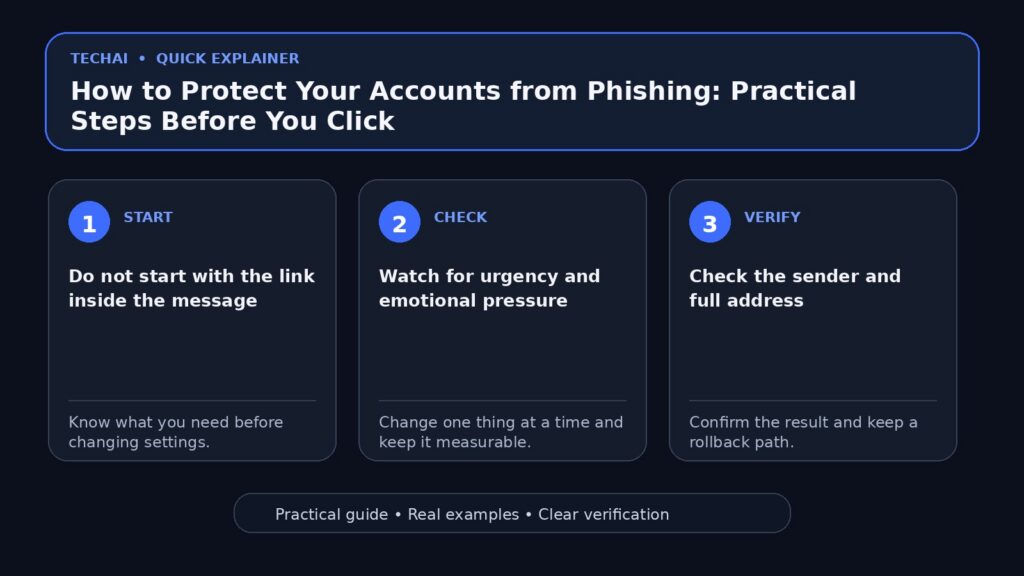
Do not start with the link inside the message
If a message claims there is a problem with your bank, email, delivery, or social account, open the official app yourself or type the official website address. Do not use the link in the message as your first source of truth.

Watch for urgency and emotional pressure
Warnings such as “your account will be closed today” or “verify immediately” are meant to shorten your decision time. Urgency alone does not prove a scam, but it is a strong reason to verify independently.
Check the sender and full address
A familiar display name can be copied. View the full email address or account information and compare it with previous legitimate communication. Small spelling changes and unrelated domains deserve attention.
Never give verification codes to another person
A one-time code or approval notification is usually meant for you alone. A support representative should not need the code that authorizes a login or payment on your behalf.
Use two-factor authentication
Two-factor authentication adds another layer when a password is stolen. Prefer methods recommended by the service, and protect the recovery methods with the same care as the main account.
Use different passwords
Reusing a password allows one breach to affect several accounts. A password manager can make unique passwords practical without requiring you to memorize each one.
Before entering any information
- Open the official service independently.
- Confirm that the request appears in your real account.
- Check the domain carefully.
- Do not enter a password after following an unexpected link unless you have independently verified the page.
If you already clicked the link
Clicking does not automatically mean an account was compromised. Close the page and do not download or run unexpected files. If you entered a password, change it from the official service and review active sessions and security alerts.
If you shared a verification code
Act quickly. Open the official account, change credentials if appropriate, sign out unknown sessions, review recovery information, and contact the service through its official support channel if the account may have been taken over.
If the message involves money
Do not rely on contact information provided by the suspicious message. Use the phone number or support channel shown in the official banking or payment app, on the official website, or on your card.
Technical signs are not enough by themselves
HTTPS, a padlock icon, professional design, and a believable logo do not prove a page is legitimate. Scam sites can use encryption and copied branding too. The domain and the way you reached the page matter more.
Teach family members one simple rule
A useful rule is: unexpected message + urgent request + link or code = verify independently first. A simple repeatable habit is often more effective than a long list of technical signs.
Quick checklist
- Pause before clicking.
- Open the service independently.
- Check the sender and domain.
- Never share verification codes.
- Use unique passwords and two-factor authentication.
- Report suspicious messages when the platform provides that option.
Use layers of protection
No single setting stops every attack. Unique passwords, two-factor authentication, device updates, recovery information, and careful verification work together.
After an incident, record what happened
If an account or payment was affected, keep screenshots, dates, transaction references, and support case numbers. This can make recovery and any later dispute easier.
The first five minutes after a suspicious click
If you clicked a suspicious link, focus on what happened next rather than panicking about the click itself.
- If you entered a password, go to the real service directly and change it.
- If that password was reused elsewhere, change those accounts too.
- Revoke unfamiliar sessions and review recent sign-in activity.
- If you entered a verification code, treat the account as exposed and secure it immediately.
- If a file downloaded, do not run it; delete it or scan it using your normal security tools.
For work, financial, or shared accounts, notify the responsible person quickly so logs and access can be reviewed while the event is recent.
Conclusion
Phishing succeeds when pressure replaces verification. Build a habit of leaving the message, opening the official service independently, and checking the request there before you share information or approve anything.